Where Minecraft Java Edition keeps your worlds
The saves folder on Windows, macOS and Linux, what a world folder holds, and how to open it in a few seconds.
2 min read
Lire en français
Every Minecraft Java Edition world you create is a plain folder on your disk. Nothing hides in an account or on a server: if you know where that folder is, you can copy it, back it up or move it to another computer. This guide shows where it is on each system.
The short answer
With the official launcher, worlds live in the saves folder inside the game folder, called .minecraft (just minecraft on macOS). Each world has its own folder, named after the world.
| System | Game folder | Your worlds |
|---|---|---|
| Windows | %APPDATA%\.minecraft |
%APPDATA%\.minecraft\saves |
| macOS | ~/Library/Application Support/minecraft |
…/minecraft/saves |
| Linux | ~/.minecraft |
~/.minecraft/saves |
These are the default locations listed by minecraft.wiki. A launcher can put the game folder somewhere else: if you play through another launcher or have changed the folder in a launcher profile, look there first.
Open the folder in a few seconds
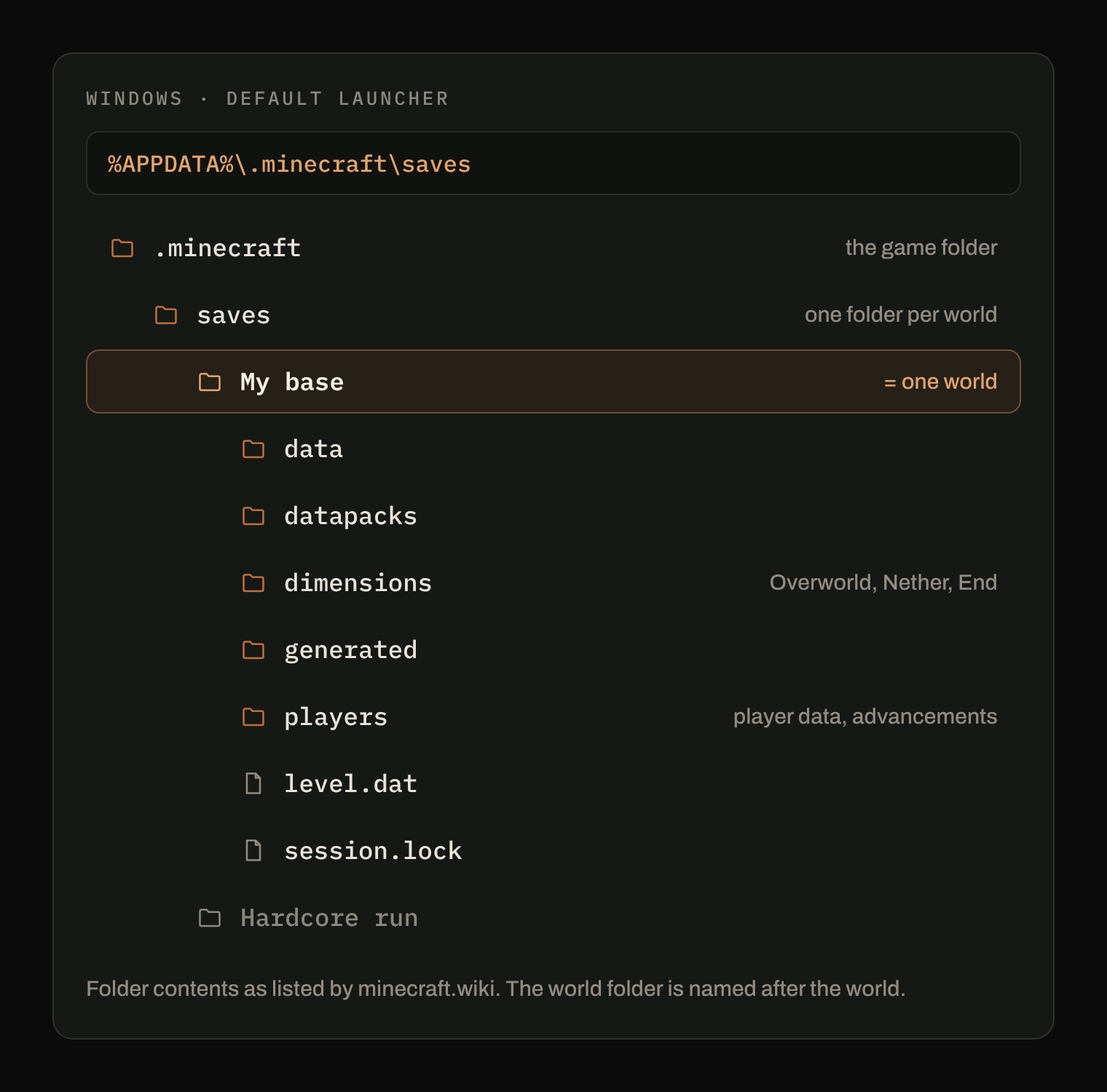
Windows. Press Windows + R, type %APPDATA%\.minecraft\saves and press Enter. %APPDATA% is a shortcut Windows understands: it leads to the AppData\Roaming folder of your account, which File Explorer hides by default, so you never have to show hidden files.
macOS. In the Finder, choose Go > Go to Folder, paste ~/Library/Application Support/minecraft/saves and press Return. Your Library folder only shows in the Go menu while you hold the Option key, which is why typing the path is the quickest way in (Apple Support).
Linux. In a terminal, xdg-open ~/.minecraft/saves opens the folder in your file manager. In the file manager itself, show hidden files (often Ctrl + H) to see .minecraft.
What is inside a world folder
minecraft.wiki lists what a world folder holds:
level.dat;dimensions, the region and entity data of the Overworld, the Nether and the End;players, player data and advancements;data,datapacksandgenerated(structure files);session.lock.
The rule that follows from it: a world is the whole folder. Copying only level.dat or only one subfolder gives you a world that is incomplete. When you back up or move a world, take the folder with everything inside.
Which folder is which world?
The folder is named after the world. When the names don't tell you enough, look at the date the files were last changed: the world you played last is the one with the most recent dates.
What Arcane does here
Arcane Powered already knows this folder. On Windows, macOS and Linux it finds saves by itself, and also reads the instances of Prism Launcher and CurseForge. It then keeps one history per world: each world has its own versions, so going back on one world never touches the others.
Sources
- .minecraft, minecraft.wiki: default locations and the content of a world folder.
- Go directly to a specific folder on Mac, Apple Support.